

Calls aren’t stored anywhere
A dispute with a customer can’t be settled, there’s nothing to train new hires on, and manager performance is judged by whatever the boss happens to overhear.
The cost: lost deals and repeated disputes
Alvis → FreePBX → Bitrix24
The Alvis gateway is installed in-line on the city E1 trunk — between the carrier and the PBX. Call logic moves to FreePBX, while the legacy PBX stays in the rack as a large, reliable analog gateway for its own phones. The result: call recording, queues, remote employees and full integration with Bitrix24 thanks to the ITGRIX connector.
Works with Panasonic TDA/TDE/NCP (TD500, TDA100/200/600, TDE100/200), LG LDK100/LDK300/ipLDK, Avaya IP Office, Ericsson MD110 and BP250, Siemens HiPath/HiCom, Samsung OS7020, Iskratel Si2000/Si3000, Meridian M-200, Multicom and Minicom DX-500, Omega, Proton-SSS, MXM500P/MP80P/MP48P — and with other exchanges that have, or can have, an E1 trunk installed.
Diagnosis
The PBX runs — and that’s the only argument in its favor. Everything else is already costing you money; those costs just aren’t tallied in one line.
A dispute with a customer can’t be settled, there’s nothing to train new hires on, and manager performance is judged by whatever the boss happens to overhear.
The cost: lost deals and repeated disputes
A rep picks up without knowing who’s calling. The history gets typed in by hand — or not at all. A missed call vanishes without a trace.
The cost: 10–30% of inbound inquiries never reach a deal
Boards get hunted down on classified-ad sites, and the one engineer who still remembers it is the only one in town. A power-supply failure means days of downtime, not hours.
The cost: the company’s phone system hangs on one person and one board
Adding 16 extensions means a fee, a license, and installation. Voicemail, conferencing, recording — each a separate activation key.
The cost: hundreds of thousands of rubles for features FreePBX has out of the box
An extension lives only inside the office. A branch, a warehouse, home, a business trip — that’s already the employee’s personal cell and lost oversight.
The cost: some of the company’s calls bypass it entirely
How many calls were lost over lunch, who isn’t picking up, the real load on a department — the PBX can’t answer any of it.
The cost: staffing and headcount decisions are made blind
How it works
The Alvis gateway is inserted in-line on the city’s E1 trunk — between the carrier and the PBX. It decides which calls go to FreePBX and which go to the legacy PBX, just as before. We don’t touch the carrier, the cross-connect, or the phones.
The city E1 trunk enters not the PBX but the Alvis gateway — which is inserted in-line on the link between the carrier and the legacy PBX. The gateway then distributes calls: some go over SIP to FreePBX, the rest pass in transit over E1 PRI into the legacy PBX, where analog and system phones keep working as before. FreePBX hands call events to the ITGRIX connector over the Asterisk interfaces (AMI/ARI), and the connector works with Bitrix24 over REST API. Only call data goes to the cloud — the voice traffic itself stays on-premise inside your network; there’s no loop through Bitrix24 cloud telephony. Highlighted in blue is what we supply and configure — the gateway and the connector.
Hover or tap a scheme element — we’ll show what it does
The E1 trunk from the carrier enters not the PBX but the gateway — it sits between the city and the legacy PBX. The gateway then decides on its own where to send a call: to FreePBX over SIP, or in transit to the PBX over E1. It speaks the PBX’s language — EDSS1, QSIG, SS7 — with hardware echo cancellation and route redundancy.
From the core of your telephony, the PBX turns into what it’s still good at: holding analog lines, executives' system handsets, the door intercom, and the fax. Nobody re-wires the cross-connect and no handsets are replaced. The call logic is taken off it — and with it go the vendor’s per-port and per-feature licenses.
This is where IVR, queues, schedules, call recording, conferencing, and softphones on laptop and mobile live. The key part — mixed subscriber groups: a single queue or pickup group happily combines an IP phone in the office, an analog handset behind the legacy PBX, and an employee’s mobile out in the field. FreePBX sees everyone and manages everyone — no matter what hardware a person is connected to. There are no per-extension or per-feature licenses.
The module listens to call events over the Asterisk interfaces and works with the portal via REST API. An inbound call pops the customer card before the handset is picked up, a missed call turns into a lead with an assignee, the recording lands in the deal’s timeline, and calling from the card takes one click.
The voice never goes to the cloud. Only call data is passed to Bitrix24 — number, direction, duration, link to the recording. The media stream stays inside your network instead of being shuttled to the cloud and back: no extra latency, no dependence of call quality on your internet link, and no charge for the portal’s cloud telephony. Works with both cloud Bitrix24 and the on-premise edition.
You can rotate your phone to landscape
Who gets what
Three people sign off on the project, and each has their own criterion. Below is exactly what changes for each of them.
Under the hood
A section for the IT team: exactly what is supported and to what extent.
Connector
The ITGRIX connector links Asterisk with Bitrix24 directly, with no audio loop through the cloud. Below are real screens from a live portal: exactly what shows up in the CRM.
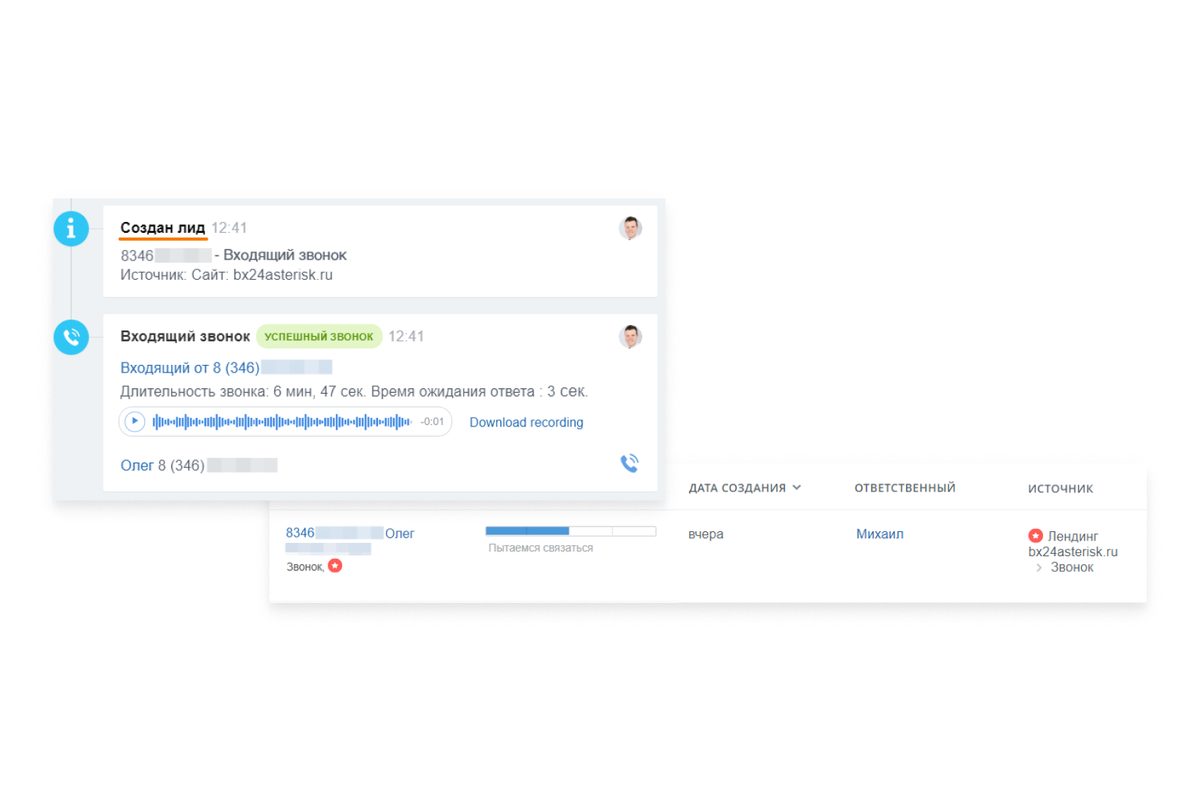
An unknown number calls in and the connector creates a lead on its own, with source and assigned manager. Not a single call is lost, even if the manager couldn’t pick up.
Learn more at itgrix.ru →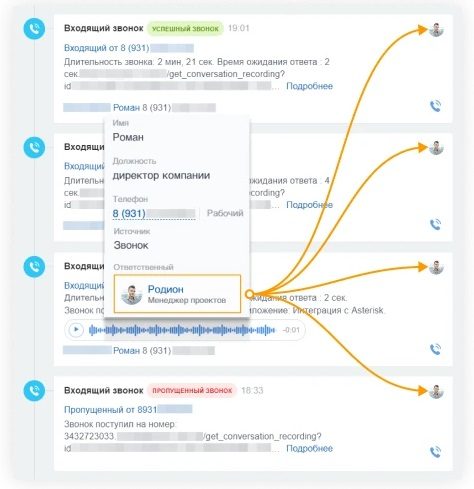
A returning customer’s call goes straight to their manager instead of the general queue, so the conversation continues with someone who already knows the history.
Learn more at itgrix.ru →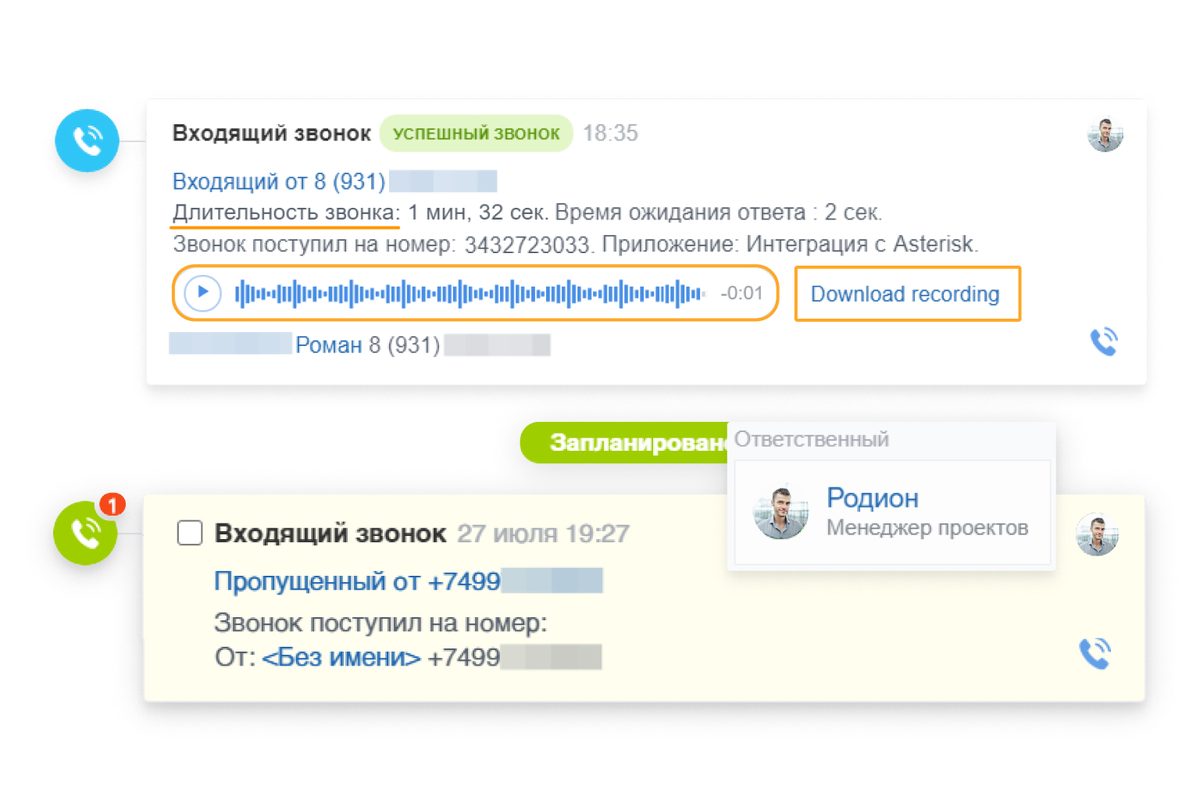
Every call is saved in the customer card: duration, time waited for an answer, and a call recording you can play back right from the CRM.
Learn more at itgrix.ru →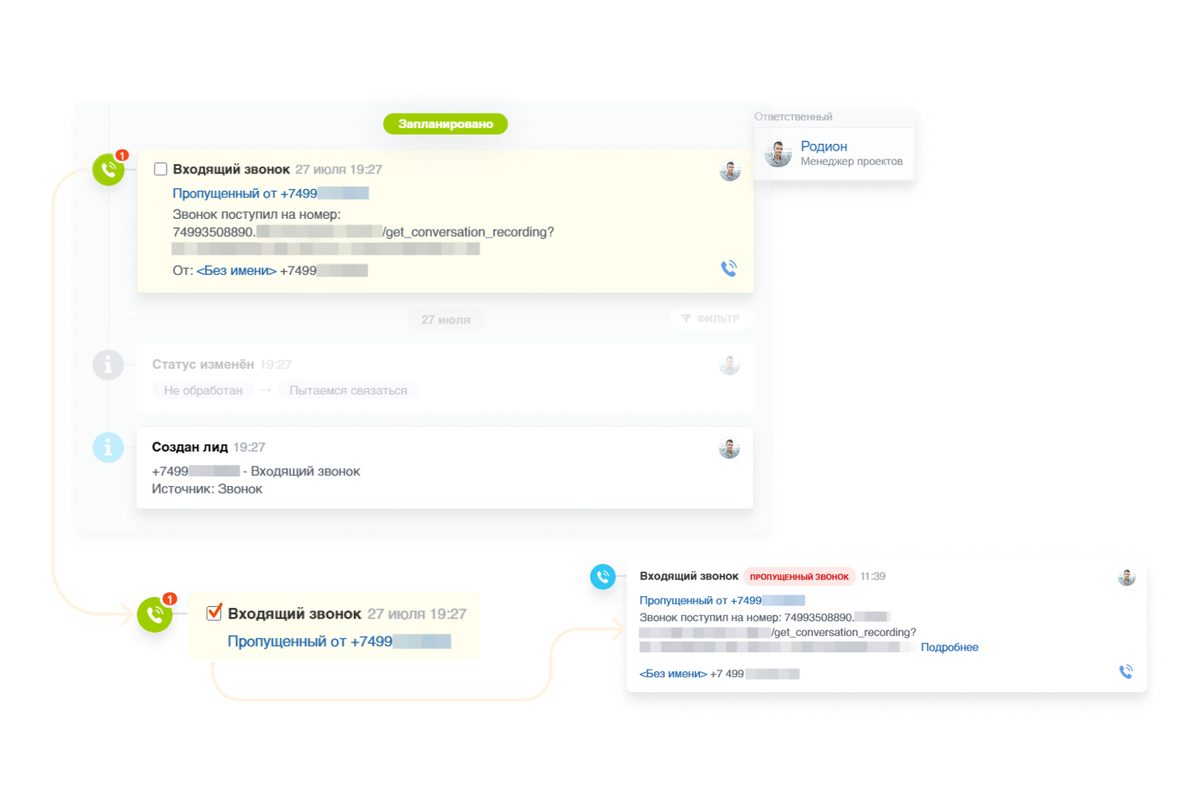
A missed call turns into a lead and a “call back” task with an assigned manager and a response deadline, so the customer is neither forgotten nor lost.
Learn more at itgrix.ru →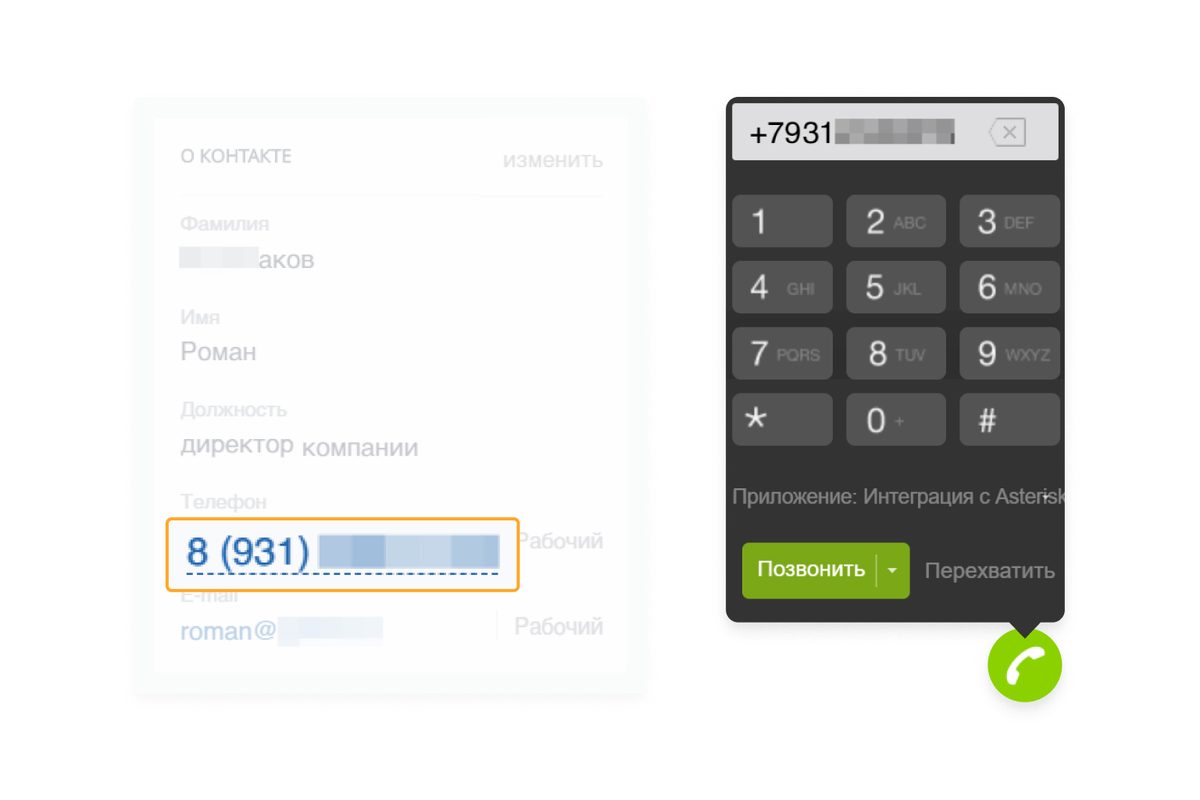
Click a number in the card and the call goes out through the softphone. No manual dialing, and no chance of misdialing.
Learn more at itgrix.ru →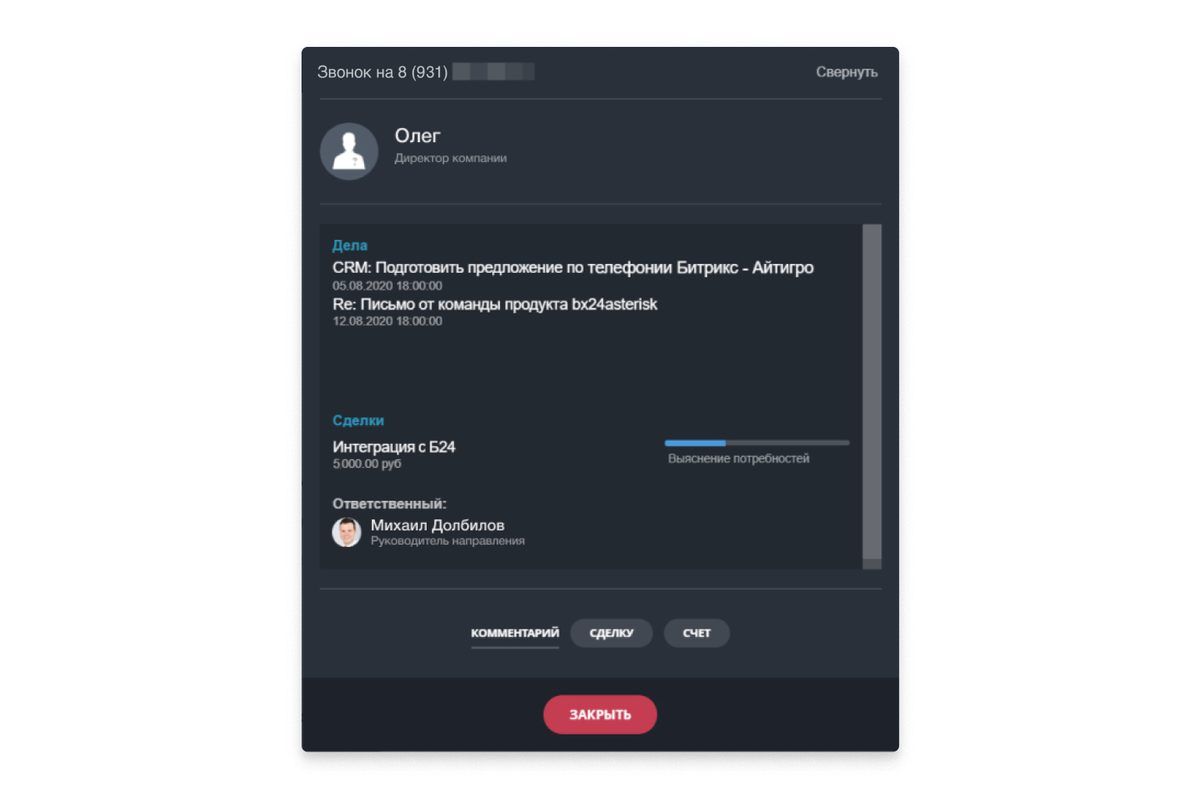
Before picking up, the manager sees the whole customer: activities, deals, assigned manager, and quick actions — comment, deal, invoice.
Learn more at itgrix.ru →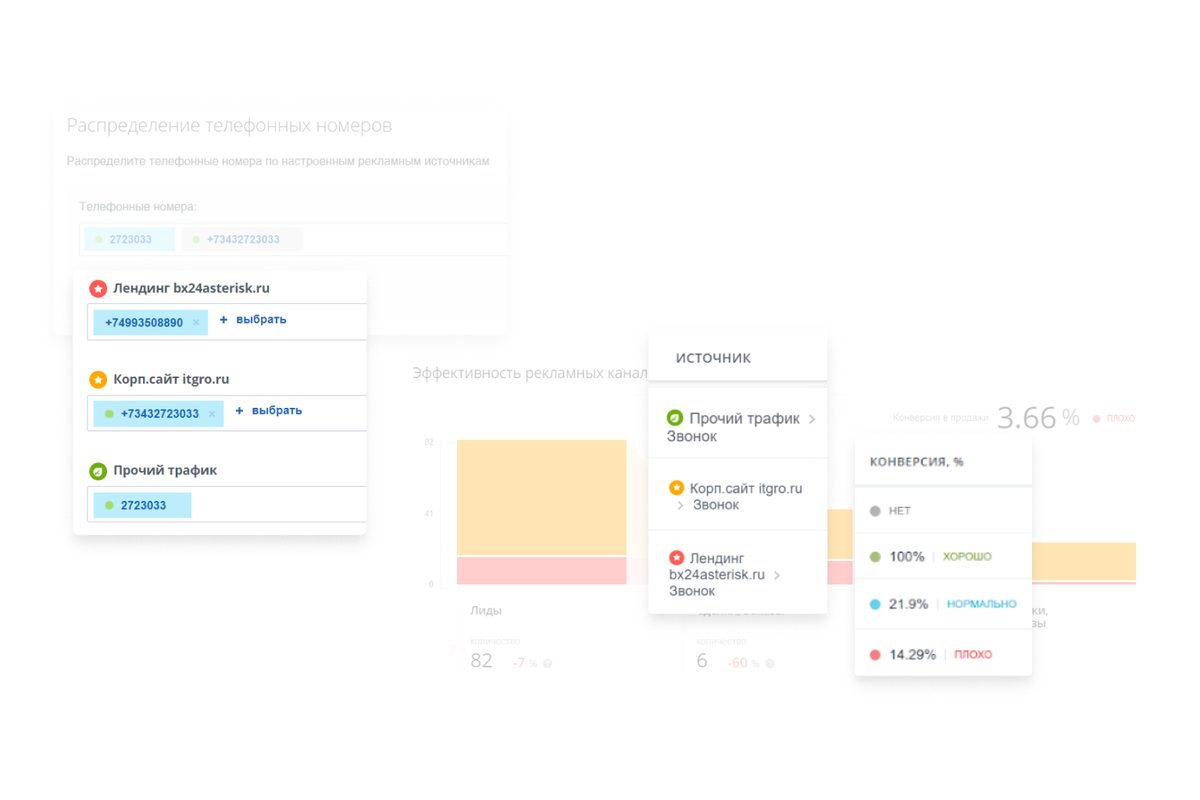
Call tracking: numbers mapped to advertising sources, channel performance, and conversion of calls into sales.
Learn more at itgrix.ru →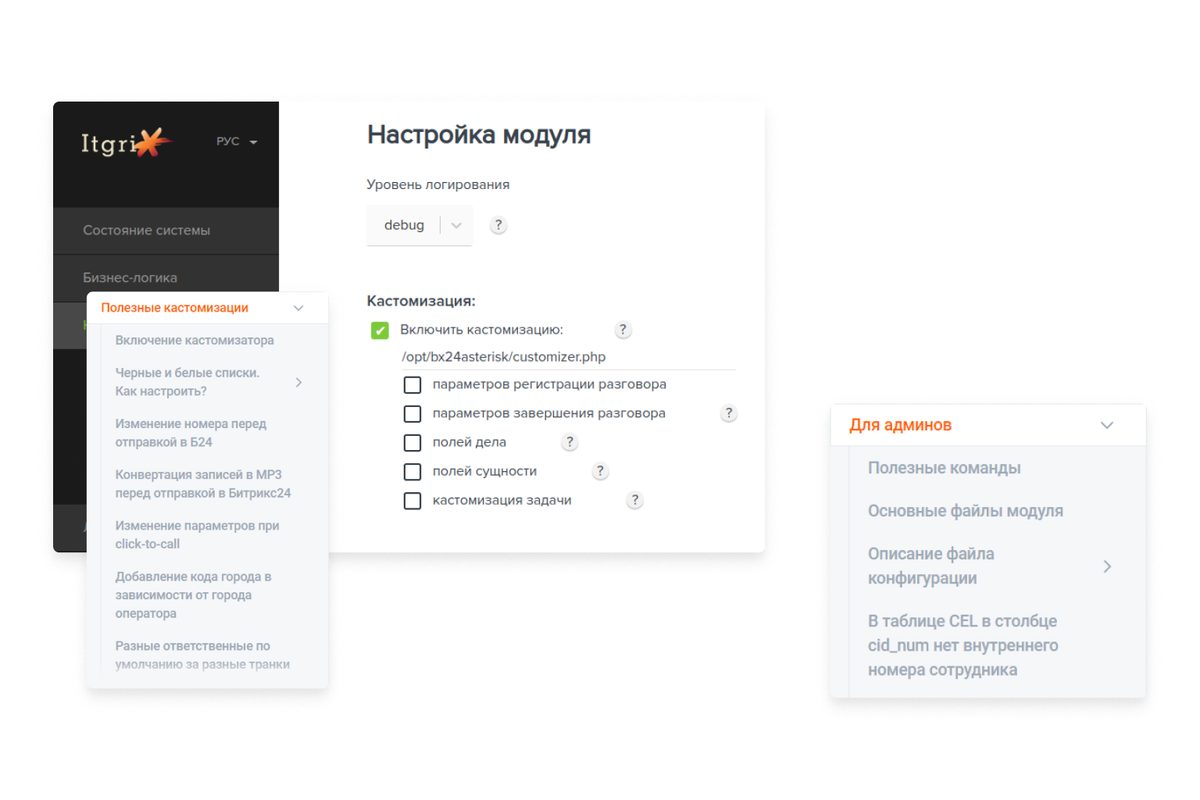
Flexible module configuration: routing rules, field handling, conversion of recordings to MP3, black/white lists, and admin commands.
Learn more at itgrix.ru →Roadmap
About 1–3 weeks in calendar time overall. We are the manufacturer, and the equipment sits in our own warehouse — there’s no waiting months for delivery, and the on-site work takes just a few days. Some stages run in parallel: while the specification is being agreed, the equipment is already being assembled.
We look at the PBX make, free E1 ports, signaling type, cross-connect, power, and network. We count the real number of extensions and simultaneous calls. The result is a report: what can be kept and what has to be replaced.
Connection diagram, numbering plan, routing scenarios, equipment list, an exact cost estimate, and a schedule. We align it with your IT team before purchasing, not after.
An Alvis gateway and, if needed, SIP phones and headsets. We manufacture the gateways ourselves and keep them in stock — no waiting for them from abroad or ordering them per project. Procurement and shipping run in parallel with approving the design, not after it. A server usually isn’t purchased: we deploy FreePBX on your existing hardware.
We set up FreePBX, bring up the E1 link on the gateway, and configure routes, IVR, queues, and recording. We test it on a staging setup while your live phone service runs as usual.
The switchover happens in an agreed cutover window — usually 30–60 minutes. We connect Bitrix24 and verify the customer card, a lead from a missed call, click-to-call, and recordings in the deal timeline. We train the administrator and the users.
From there, migration proceeds without rush and without large one-off costs: departments move to hardware IP phones one at a time, slots on the old PBX are gradually freed up, and the familiar numbering is preserved. You can stop and settle in at any step. In parallel: monitoring, updates, changes to scenarios, and adding numbers; the response SLA is fixed in the contract.
From our practice
Three configurations that come up most often. Find yours — the scope of work and the ballpark figures will be close.
The scenarios are generalized: these are typical project configurations, not case studies of specific customers. Real references with contacts are provided on request during negotiations.
Estimate it yourself
Four parameters — and you get ballpark figures, a realistic timeline, and a list of what to check on your side before work begins.
Estimated budget
—
one-time costs: hardware, work and integration. Extensions and call recording don’t affect the total — there are no per-extension or per-feature licenses in FreePBX.
What the total is made of. Hover over an estimate line — the segment highlights.
Deployment timeline
—
from audit to traffic cutover
Checklist: what to prepare
This estimate is approximate and is not an offer. An exact quote follows the audit: the price depends on the PBX brand, signaling type, cross-connect condition, and recording storage requirements.
Send the estimate and get an exact quoteHow much it costs
Three standard configurations. The amounts are one-time: equipment, labor, and integration. There are no per-extension licenses or subscription fees for FreePBX features. “From” is the lower bound of the same estimate as in the calculator above.
Replace the core and remove dependence on the old system
from $2,000
Configuration: 2×E1, FreePBX on your infrastructure, no CRM integration. Extensions — as many as needed
Most popular
Full-featured telephony with CRM and recording
from $2,700
Configuration: 2×E1, FreePBX on your infrastructure, basic integration, call recording
When communication downtime is unacceptable
from $7,000
Configuration: 4×E1, two dedicated servers, advanced integration, recording
| Feature | Basic | Standard | High-availability |
|---|---|---|---|
| Keeping your numbers and E1 stream | yes | yes | yes |
| Existing phones, no replacement | yes | yes | yes |
| Extensions | as many as needed | as many as needed | as many as needed |
| Per-number and per-feature licenses | no | no | no |
| E1 streams | 2 | 2 | 4 |
| FreePBX hosting | your infrastructure | your infrastructure | two dedicated servers |
| IVR, queues, schedules | yes | yes | yes |
| Softphone, FMC, remote employees | yes | yes | yes |
| Call recording | yes | yes | yes |
| Bitrix24 integration | no | basic | advanced |
| Lead from a missed call | no | yes | yes |
| Second node and automatic failover | no | no | yes |
| Response SLA | on request | on request | in the contract |
| Implementation time | 1–3 weeks | 1–3 weeks | 3–5 weeks |
Prices are approximate, apply to standard configurations, and do not constitute a public offer. Post-delivery support is priced separately and depends on the required response time.
First step
Send us your PBX brand and approximate number of employees — we’ll tell you whether this setup fits, and give you a ballpark cost. It’s free and carries no obligation.
Straight answers
The key questions we hear at the first meeting. Don’t see yours? Use the search or ask us through the form.
Yes. We don’t change your carrier and we don’t port numbers — the E1 trunk stays the same, and so does your service contract. The only thing that changes is what happens to a call once it arrives: previously it went to the legacy station, now it reaches FreePBX through the Alvis gateway.
There’s no need to replace phones. Analog and system phones stay on the legacy PBX and work exactly as before. New IP phones or a softphone are only needed for the employees you move to FreePBX — usually sales, support, and remote workers.
If you later decide to move everyone, it’s done gradually, phone by phone as needed, rather than all in a single day.
The main work is done on a separate test bench while your production telephony keeps running as usual. The actual cutover is a single agreed window, typically 30–60 minutes, most often early in the morning or after the end of the workday.
If something goes wrong, the route falls back to the legacy station — it physically stays in place and is not dismantled.
Yes, and it’s a common scenario. The first phase is the gateway, FreePBX, and one department — sales, for example. Everyone else keeps working on the legacy PBX. Once you’re satisfied that everything works, you connect the next department. The Bitrix24 integration can also be deferred to a second phase.
If your carrier already offers SIP instead of E1, a gateway is still needed, but on the other side. Alvis takes the place of the E1 link being removed: the carrier delivers SIP, and the gateway converts it into E1 for your legacy station so its phones keep working. Nothing has to be reconfigured on the PBX side — it keeps receiving its E1 trunk just as before.
This is a separate and increasingly common task: providers are migrating customers from trunks to SIP, and the monthly fee for E1 is noticeably higher. As a bonus, you can route long-distance traffic through a more cost-effective SIP operator.
On your own server, inside your own perimeter. Neither the recordings nor the CDRs leave for a third-party cloud. This matters if you process personal data and are required to comply with Federal Law 152-FZ.
The retention period, the list of people with access, and the deletion policy are configured according to your internal rules. Playback from Bitrix24 still works — the CRM accesses the recording by link rather than storing it itself.
Internal calls and landline calls over E1 will keep working: both the gateway and FreePBX sit in your own network and don’t need the internet for this. Without internet, only external services stop working — the cloud version of Bitrix24 and remote employees outside the office.
Your administrator receives access and training — adding numbers, editing schedules, and IVR changes are done through the web interface without a contractor. Beyond that, under the contract: monitoring, updates, call-flow changes, and incident response times. You choose the scope of support.
The solution is open: Asterisk/FreePBX, standard SIP, and a documented Bitrix24 REST API. Any qualified contractor can maintain it — no one is locking you in.
Nothing matched your search. Ask your question through the form and we’ll answer you personally.